Posts

How to : generate an external trigger after the completion of BYODW export using the business event in Dynamics 365 Finance and Operations

Image
In BI projects for Dynamics 365 Finance and Operations, the most common requirement is the trigger when the BYODW batch job completes the data population. Usually, to start another process on exported data. After some research, we found the best solution for this is to create a custom business event. Business events in Dynamics 365 are robust and flexible enough to be used for many different scenarios. To understand the Business events framework, please go through  https://docs.microsoft.com/en-us/dynamics365/fin-ops-core/dev-itpro/business-events/home-page The business events framework provides different endpoints for the consumption of the trigger. Azure Service Bus Queue Azure Service Bus Topic Azure Event Grid Azure Event Hub HTTPS Microsoft Power Automate Below is the custom code required for the generation of events. We need 4 classes:  1. BYODWBusinessEvent  2. BYODWBusinessEventContract 3. DMFPackageExporter_Extension (This is for m...

How to: Use enum values instead of integers in BI reports for Dynamics 365 finance and operations

Image
For most of the BI projects related to Dynamics 365 finance and operations, We need to use BYODW to use Power BI or any other BI tools. As we know, enum fields are stored as integers in SQL, so data populated in BYODW comes as integers instead of the enum value. To display this data either you can hardcode values in SQL statements or in BI tools. Instead, we can use SRSAnalysisEnumsEntity in Dynamics 365 F&O. It exports the data from the SRSAnalysisEnums table which holds all the enum and respective enum elements used in perspective. If the enum is missing from the list then below job can be used to insert the data in SRSAnalysisEnums table. class SRSAnalysisEnumsGenerator {     public static void main(Args _args)     {         SRSAnalysisEnums analysisEnums;         DictEnum currentEnum;         str currentEnumName;         int valueCount;       ...

How to: configure cleanup of data management execution history

Image
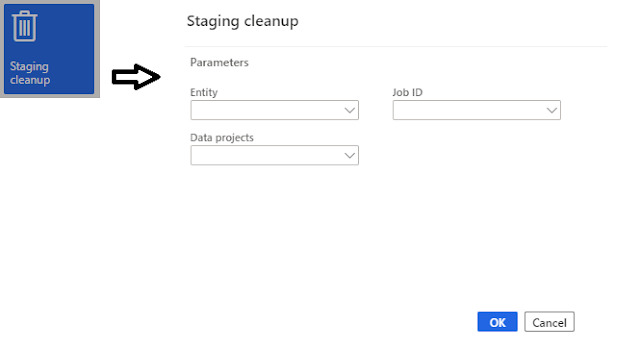
In PU 29, 'Execution history cleanup' feature has been added. This feature allows system administrator to schedule the batch job to clean up all data management execution history. Clean up mechanism(called staging cleanup) was available in D 365 for some time now but it was not possible to schedule it as a batch job. Once you enable feature from feature management, you should be able to see new tile called job history clean up. This will open up the job history clean up dialog where you can set 2 parameters Number of days to retain history Number of hours to execute the job This was much needed batch job when you have a lot of  integration/data import export using data management, lot of records gets created in staging table and DMF framework tables. If BYODW is configured with lot of data entities then table size grow quickly and causes performance issues.  This batch jobs reduces a lot manual efforts required for housekeeping by admin. You can ...

How to : Adding new SSRS report formats to print management

Image
I had requirement to create few custom SSRS designs and show them in print management for D 365 Finance and Operations. I created new designed in SSRS and deployed the reports but new formats were not coming in print management setup. For this we need to create a record in "PrintMgmtReportFormat" table in D 365 FOE. To access the table, you can use below URL:  https://<BASE D 365 URL>/?cmp=<COMPANY>&mi=SysTableBrowser&tablename=PrintMgmtReportFormat Form looks like below: Click on New and add the new format name with corresponding the DocumentType. This table is company specific so make to add the formats to required company/ies. Note: This works on Dev environments, not on Sandbox/Prod.

How to: Solve issue when DVT script for service model MRApplicationService on machine XXX failed

Image
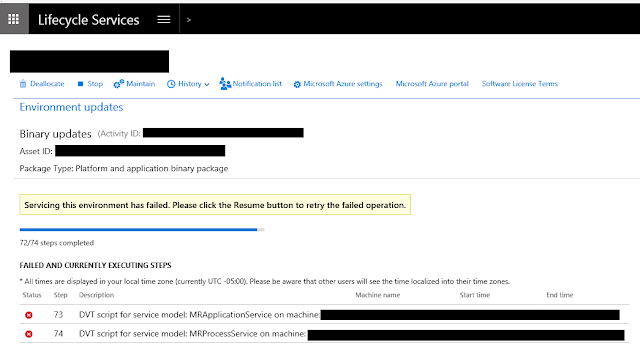
I was running binary update from LCS when my deployment failed. The step which failed had a description " DVT script for service model MRApplicationService on machine XXX failed" When I checked the log, It was showing "Financial Reporting DVTs ran with 2 failures". To resolve it, I just reset the DataMart and resumed the deployment from LCS which then completed successfully. Those who do not know how to reset DataMart, We have to run the following command in Windows PowerShell. cd J:\MROneBox\MRInstallDirectory\Server\MRDeploy Import-module .\MRDeploy.psd1 Reset-DatamartIntegration -Reason OTHER -ReasonDetail "DB Refresh" 1st line is to change the directory where MRDeploy.psd1 script exists. depending on the environment typologies  some other common places where it can be found is G:\MRApplicationService\MRInstallDirectory\Server\MRDeploy K:\MROneBox\MRInstallDirectory\Server\MRDeploy 2nd line is to import the Script 3rd line is for ...

How to : Make hard disk space available on D 365 VM

Image
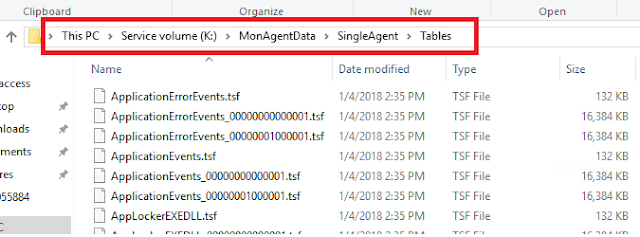
When Binary update/platform update is being applied, often  we have seen that it fails after performing some steps. When we analyse it, often issue is "Insufficient hard disk space".  So what do we delete to make enough space (min 15GB recommended)? You can start with Temp folders but that wont be enough. Next you can delete the content of  "K:\MonAgentData\SingleAgent\Tables" You may not be able to delete all the files when they are open in Monitoring agent like below: In that case you will need to stop the MonAgentCore.exe service from Task manager. It is good practice to check/make the hard disk space available before you start any updates from LCS.

How to: Get ledger dimension from string in D 365 FOE

I came across a requirement where financial dimensions were coming in XML from integration and Account number was to be determined using business logic. I had to create a general journal from this integration. So situation is : Find the account number from business login in D 365. Get the financial dimensions from integration. Create a journal line from above info. Code to do above is as follows: DimensionDynamicAccount ledgerAccount; switch(<AccountType>) { case (LedgerJournalACType::Cust) : ledgerJournalTrans.AccountType = LedgerJournalACType::Cust; ledgerAccount = LedgerDynamicAccountHelper::getDynamicAccountFromAccountNumber(<AccountNum>, LedgerJournalACType::Cust); ledgerJournalTrans.LedgerDimension = ledgerAccount; break; case (LedgerJournalACType::Ledger) : ledgerJournalTrans.AccountType = LedgerJournalACType::Ledger; ledgerAccount = LedgerDefaultAccountHelper::getDefaultAccountFromMainAccountRecId(MainAccount::findByMainAccount...