Posts

How to: Update the data in D365FO table in production environment

Image
 Did you ever wish that you could just update or delete some data in D365FO production with out custom script route. The way we had access to AX 2012 AOT tables. Of course it is not possible to do it in D 365 FO directly but I developed a small job which accepts some parameters to update/ delete the data in production environment directly.  THIS IS ONLY FOR SENIOR DEVELOPER who understands the D365FO table structure properly and understand the consequences of updating the data in prod. So Please use it with caution and check the result in an environment where Production copy exists. internal final class XXXDataOprerations {     /// <summary>     /// Class entry point. The system will call this method when a designated menu      /// is selected or when execution starts and this class is set as the startup class.     /// </summary>     /// <param name = "_args">The specif...

How to: Update 1 financial dimension of ledger dimension in D365FO in X++

 I received a request to update the cost center financial dimension for the posted GL transactions for the fixed asset depreciation journal. There was an issue with master data, and the default financial dimensions were corrected after the journal was posted.  Below is the job that I created to update the FD on the Ledger dimension using the default dimension .  public static void main(Args _args)     {         GeneralJournalAccountEntry          GeneralJournalAccountEntryUpd;         GeneralJournalEntry                 GeneralJournalEntryUpd;         AssetTrans                          assetTrans;         AssetBook                           assetBook;         Di...

How to: resolve the issue of "Your connection isn't private" for Dynamics 365 Finance and Operations

Image
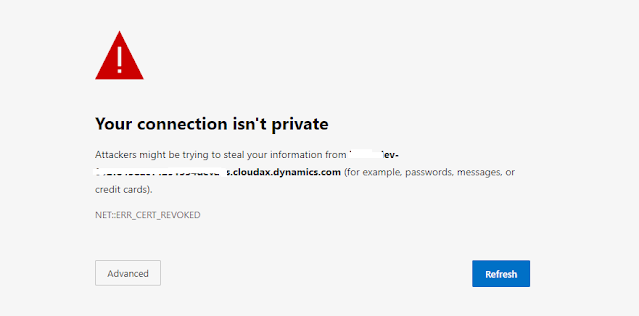
 Recently I received the below error when I tried to open the cloud-hosted D365FO development URL Your connection isn't private NET::ERR_CERT_REVOKED This is error comes when the SSL certificate is expired. To resolve the issue we need to login to LCS.  Go to Environment -> Full details -> Maintain -> Rotate secrets -> Rotate SSL certificates

How to: Access Just In Time Self-service UAT database for Dynamics 365 Finance and Operations

Image
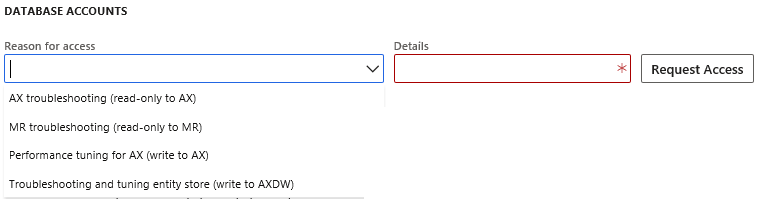
 In recent changes by Microsoft, you can't access the VM for Tier2+ environments. The only access you have is access to the Azure SQL database using Just In Time access. You get temporary access to different databases of UAT according to your need. This is access is only for 8 hours, post that you need to request access again. Let's access the AX database: Login to LCS Go to UAT environment -> Full details. You should see request access controls like below: you can get access as read-only or read-write depending on your request. 'AX troubleshooting' will give read-only access and 'Performance tunning for AX' will give read-write access to Azure SQL. Once you click on Request access, refresh the page you should see 'Database accounts' section: In the above screenshot, I requested both access.  The next step is to enable access using IP whitelisting. Go to Maintain -> Enable access You need to add the public IP address from where you are going to acc...

How to : get the Deep URL for a particular form with filter in Dynamics 365 Finance and Operations

Image
 If you are a developer and need to generate the Deep-link then you can follow the code mentioned in MS docs at https://docs.microsoft.com/en-us/dynamics365/fin-ops-core/dev-itpro/user-interface/create-deep-links But if you want to share a few URLs with filters already applied to other users then you can use the feature of  'Get a link' in D365FO. Suppose I want to share the list of all sales orders for customer 'US-001'. Go to Account Receivable -> Orders -> All sales orders  Filter by customer account 'US-001' Then in the navigation ribbon, go to Options and click on 'Get a link'   Copy all and paste the URL into new browser window. You will only see the sales orders for US-001. If you want to generate lot of deep URLs then you can also enable  'Automatically update query parameter' Once you enable this, as soon as you apply a filter on forms URL will be updated with the query parameters like below: You can copy and share the link directl...